


When we start splitting a .NET application into multiple services, one problem appears almost immediately.
Imagine our system has three APIs:
Order Service
Customer Service
Notification Service
Each service runs separately.
Maybe locally they look like this:
Order Service          → http://localhost:7101
Customer Service       → http://localhost:7201
Notification Service   → http://localhost:7301
Technically, our frontend could call all three directly:
Client
 ├── http://localhost:7101/api/orders
 ├── http://localhost:7201/api/customers
 └── http://localhost:7301/api/notifications
It works.
But I wouldn’t want the client to know this architecture.
The frontend now needs to know:
how many services exist;
where each service is hosted;
which port belongs to which service;
when a service URL changes;
how authentication differs;
how service scaling works.
We have leaked our backend architecture into the client.
A cleaner design is:
                         ┌── Order Service
                         │
Client ──→ YARP Gateway ─┼── Customer Service
                         │
                         └── Notification Service
The client knows only one URL:
https://api.mycompany.com
Then:
/api/orders/*          → Order Service
/api/customers/*       → Customer Service
/api/notifications/*   → Notification Service
This is one of the areas where YARP — Yet Another Reverse Proxy — becomes extremely useful in ASP.NET Core.
1. Before YARP, understand the problem
Let’s say we have a React, Angular, mobile, or another .NET client.
The client needs an order.
Without a gateway:
Client
   ↓
http://orders.company.com/api/orders/1001
Then it needs customer information:
Client
   ↓
http://customers.company.com/api/customers/500
Then notifications:
Client
   ↓
http://notifications.company.com/api/notifications
The client now understands our infrastructure.
That doesn’t feel right.
Instead, I’d rather expose:
https://api.company.com
and let the gateway figure out the rest.
So the client calls:
GET https://api.company.com/api/orders/1001
YARP sees:
/api/orders/1001
and decides:
This request belongs to Order Service.
Then YARP forwards it internally.
Client
   ↓
YARP
   ↓
Order Service
The client doesn’t need to know that Order Service happens to be running at:
http://10.20.5.17:7101
That is now an infrastructure concern.
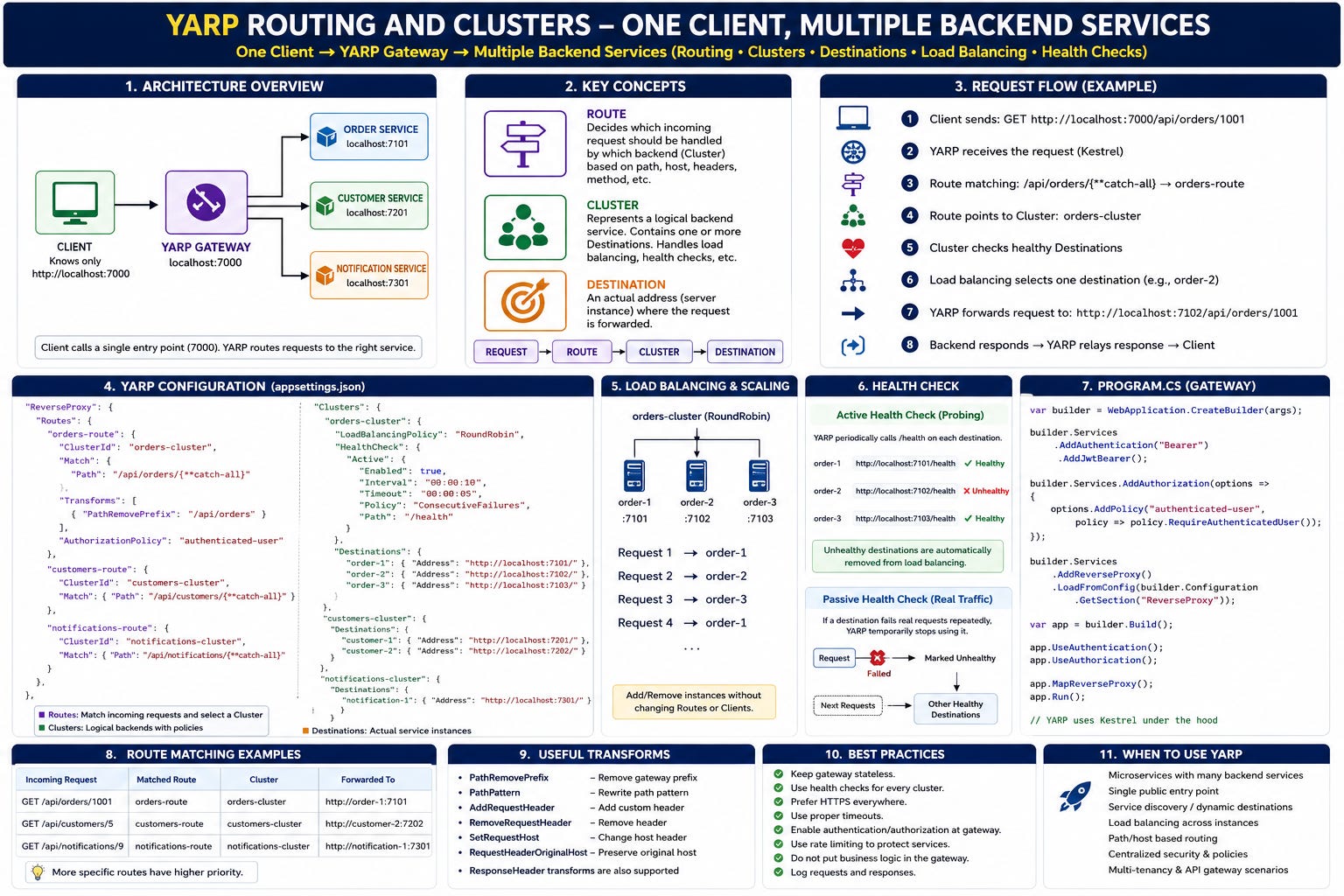
2. The three YARP words we really need to understand
Most YARP configuration starts making sense once these three words are clear:
Route
Cluster
Destination
I remember them like this:
Route       → Which request?
Cluster     → Which service/group?
Destination → Which actual server instance?
That single distinction clears up most of YARP.
Microsoft’s current YARP configuration model works exactly around routes pointing to clusters, with clusters containing one or more destinations.
Let’s look at each one.
3. What is a Route?
A route decides whether an incoming request belongs to some backend service.
For example:
/api/orders/{anything}
could become:
OrderRoute
Another route:
/api/customers/{anything}
becomes:
CustomerRoute
Think:
Incoming URL
     ↓
Route Matching
     ↓
Which backend should receive this?
For example:
GET /api/orders/1001
matches:
/api/orders/{**catch-all}
Therefore:
OrderRoute
is selected.
But the route doesn’t necessarily contain the actual server URL.
Instead, it usually says:
Use OrderCluster.
That’s our next concept.
4. What is a Cluster?
A cluster represents a logical backend.
For example:
OrderCluster
CustomerCluster
NotificationCluster
Think:
OrderCluster
      ↓
The group of servers capable of handling Order requests
That distinction becomes important when we scale.
Today we may have:
OrderCluster
   ↓
http://localhost:7101
Tomorrow:
OrderCluster
   ├── Order Service Instance 1
   ├── Order Service Instance 2
   └── Order Service Instance 3
The route hasn’t changed.
The client hasn’t changed.
Only the cluster topology changed.
That’s a nice separation.
5. Then what is a Destination?
A destination is an actual address YARP can send the request to.
For example:
https://www.youtube.com/@DotNetFullstackDev
OrderCluster
   │
   ├── destination-1
   │      ↓
   │   http://order01:8080/
   │
   ├── destination-2
   │      ↓
   │   http://order02:8080/
   │
   └── destination-3
          ↓
       http://order03:8080/
So the hierarchy is:
REQUEST
   ↓
ROUTE
   ↓
CLUSTER
   ↓
DESTINATION
This is probably the most important diagram in the article.
6. Our application architecture
Let’s build one real example.
We’ll have:
Shopping.Client
ApiGateway
OrderService
CustomerService
NotificationService
Ports:
ApiGateway            → http://localhost:7000

OrderService          → http://localhost:7101
CustomerService       → http://localhost:7201
NotificationService   → http://localhost:7301
But our client knows only:
http://localhost:7000
Architecture:
                     ┌─────────────────────────┐
                     │       Client App        │
                     │                         │
                     │ Knows only port 7000    │
                     └────────────┬────────────┘
                                  │
                                  ▼
                     ┌─────────────────────────┐
                     │      YARP Gateway       │
                     │     localhost:7000      │
                     └────────────┬────────────┘
                                  │
                 ┌────────────────┼─────────────────┐
                 │                │                 │
                 ▼                ▼                 ▼

         Order Service     Customer Service   Notification Service
             :7101              :7201               :7301
The client calls:
GET /api/orders/1001
YARP forwards to:
http://localhost:7101/api/orders/1001
The client calls:
GET /api/customers/500
YARP forwards to:
http://localhost:7201/api/customers/500
Simple idea.
Very useful architecture.
7. Let’s create the backend services first
Order Service
var builder = WebApplication.CreateBuilder(args);

var app = builder.Build();

app.MapGet("/api/orders/{id:int}", (int id) =>
{
    return Results.Ok(new
    {
        OrderId = id,
        Product = "Laptop",
        Quantity = 1,
        Service = "OrderService"
    });
});

app.Run();
Run it on:
http://localhost:7101
For local testing we could use:
{
  "profiles": {
    "http": {
      "commandName": "Project",
      "applicationUrl": "http://localhost:7101"
    }
  }
}
8. Customer Service
var builder = WebApplication.CreateBuilder(args);

var app = builder.Build();

app.MapGet("/api/customers/{id:int}", (int id) =>
{
    return Results.Ok(new
    {
        CustomerId = id,
        Name = "John",
        Service = "CustomerService"
    });
});

app.Run();
Run:
http://localhost:7201
9. Notification Service
var builder = WebApplication.CreateBuilder(args);

var app = builder.Build();

app.MapGet("/api/notifications/{customerId:int}", (int customerId) =>
{
    return Results.Ok(new
    {
        CustomerId = customerId,
        UnreadNotifications = 3,
        Service = "NotificationService"
    });
});

app.Run();
Run:
http://localhost:7301
Now we have three independent ASP.NET Core applications.
10. Create the YARP gateway
Create another ASP.NET Core project:
dotnet new web -n ApiGateway
Then install YARP:
dotnet add package Yarp.ReverseProxy
Our gateway’s Program.cs is surprisingly small.
var builder = WebApplication.CreateBuilder(args);

builder.Services
    .AddReverseProxy()
    .LoadFromConfig(
        builder.Configuration.GetSection("ReverseProxy"));

var app = builder.Build();

app.MapReverseProxy();

app.Run();
That’s basically enough to create a functional reverse proxy.
YARP can load its routes and clusters using ASP.NET Core’s normal IConfiguration system, and configuration-backed proxy definitions can be refreshed when the underlying configuration changes.
11. Now the important part: appsettings.json
{
  "ReverseProxy": {

    "Routes": {

      "orders-route": {
        "ClusterId": "orders-cluster",
        "Match": {
          "Path": "/api/orders/{**catch-all}"
        }
      },

      "customers-route": {
        "ClusterId": "customers-cluster",
        "Match": {
          "Path": "/api/customers/{**catch-all}"
        }
      },

      "notifications-route": {
        "ClusterId": "notifications-cluster",
        "Match": {
          "Path": "/api/notifications/{**catch-all}"
        }
      }

    },

    "Clusters": {

      "orders-cluster": {
        "Destinations": {
          "orders-service": {
            "Address": "http://localhost:7101/"
          }
        }
      },

      "customers-cluster": {
        "Destinations": {
          "customers-service": {
            "Address": "http://localhost:7201/"
          }
        }
      },

      "notifications-cluster": {
        "Destinations": {
          "notifications-service": {
            "Address": "http://localhost:7301/"
          }
        }
      }

    }
  }
}
Don’t look at this as one large JSON file.
Read it as relationships.
12. Read the configuration like English
This:
Keep the Momentum Going — Support the Journey
If this post helped you level up or added value to your day, feel free to fuel the next one — Buy Me a Coffee powers deeper breakdowns, real-world examples, and crisp technical storytelling.
"orders-route": {
  "ClusterId": "orders-cluster",
  "Match": {
    "Path": "/api/orders/{**catch-all}"
  }
}
means:
Whenever the request begins with
/api/orders, send it toorders-cluster.
Then:
"orders-cluster": {
  "Destinations": {
    "orders-service": {
      "Address": "http://localhost:7101/"
    }
  }
}
means:
orders-clustercurrently contains one destination: Order Service running on port 7101.
Put together:
/api/orders/*
      ↓
orders-route
      ↓
orders-cluster
      ↓
http://localhost:7101
That’s YARP.
13. Follow one request end to end
Our client sends:
GET http://localhost:7000/api/orders/1001
First:
Kestrel receives request
Then ASP.NET Core routing reaches YARP.
YARP examines configured routes.
It sees:
/api/orders/1001
matching:
/api/orders/{**catch-all}
So YARP selects:
orders-route
The route points to:
orders-cluster
The cluster currently has:
orders-service
at:
http://localhost:7101/
YARP therefore creates an outgoing request:
GET http://localhost:7101/api/orders/1001
Order Service responds:
{
  "orderId": 1001,
  "product": "Laptop",
  "quantity": 1,
  "service": "OrderService"
}
YARP relays that response back.
From the client’s point of view:
Client → localhost:7000
That’s all it knows.
The complete reality was:
Client
   ↓
localhost:7000
   ↓
Kestrel
   ↓
ASP.NET Core
   ↓
YARP Route Matching
   ↓
orders-route
   ↓
orders-cluster
   ↓
orders-service
   ↓
localhost:7101
   ↓
OrderService
   ↓
Response
   ↓
YARP
   ↓
Client
14. Why separate Route and Cluster?
At first I wondered why YARP doesn’t simply allow this:
/api/orders/* → http://localhost:7101
Why introduce another object called a cluster?
Scaling gives us the answer.
Suppose Order Service becomes heavily used.
We start three instances:
OrderService-1 → http://localhost:7101
OrderService-2 → http://localhost:7102
OrderService-3 → http://localhost:7103
Now:
"orders-cluster": {

  "LoadBalancingPolicy": "RoundRobin",

  "Destinations": {

    "order-1": {
      "Address": "http://localhost:7101/"
    },

    "order-2": {
      "Address": "http://localhost:7102/"
    },

    "order-3": {
      "Address": "http://localhost:7103/"
    }

  }
}
Nothing changes in the client.
https://www.youtube.com/@DotNetFullstackDev
Nothing changes in our route.
Still:
/api/orders/*
      ↓
orders-route
      ↓
orders-cluster
But the cluster now has three destinations.
That’s exactly why the abstraction exists.
15. Now YARP becomes a load balancer
Request 1:
Client
  ↓
YARP
  ↓
OrderService-1
Request 2:
Client
  ↓
YARP
  ↓
OrderService-2
Request 3:
Client
  ↓
YARP
  ↓
OrderService-3
Request 4:
Client
  ↓
YARP
  ↓
OrderService-1
when using:
"LoadBalancingPolicy": "RoundRobin"
YARP has built-in destination-selection policies. If no load-balancing policy is explicitly configured, current YARP uses PowerOfTwoChoices by default.
So a cluster isn’t merely a URL holder.
It represents:
Logical Service
+
Destinations
+
Load Balancing
+
Health Checking
+
Session Affinity
+
HTTP Client Configuration
+
Other cluster-level behavior
16. Route and Cluster have different responsibilities
This distinction is worth remembering.
Route
A route cares about the incoming request.
Things like:
Path
Host
HTTP method
Headers
Authorization policy
CORS policy
Transforms
Rate limiting
Timeout policy
Cluster
A cluster cares about where and how to send the request.
Things like:
Destinations
Load balancing
Destination health
Session affinity
HTTP client configuration
Outgoing request behavior
Current YARP exposes health checks, HTTP client/request settings, load-balancing policy, metadata, session affinity, and destinations as cluster-level concepts.
A good mental shortcut is:
Route   = incoming side
Cluster = outgoing side
Not technically perfect for every feature, but extremely useful.
17. Multiple routes can point to the same cluster
Now consider:
/api/orders/*
/api/order-history/*
Both might belong to Order Service.
We don’t need two destination definitions.
We can have:
orders-route
       ┐
       │
       ├────→ orders-cluster
       │
history-route
Example:
"Routes": {

  "orders-route": {
    "ClusterId": "orders-cluster",
    "Match": {
      "Path": "/api/orders/{**catch-all}"
    }
  },

  "history-route": {
    "ClusterId": "orders-cluster",
    "Match": {
      "Path": "/api/order-history/{**catch-all}"
    }
  }

}
That’s another reason routes and clusters shouldn’t be the same concept.
18. Path transforms — one of the most useful YARP features
Suppose our public URL is:
/api/orders/100
But internally Order Service exposes:
/orders/100
We don’t want our internal service’s URL design to dictate the public API.
We can transform the request.
For example:
"orders-route": {

  "ClusterId": "orders-cluster",

  "Match": {
    "Path": "/api/orders/{**catch-all}"
  },

  "Transforms": [
    {
      "PathPattern": "/orders/{**catch-all}"
    }
  ]
}
Now:
Client request:

/api/orders/100
can become:
Backend request:

/orders/100
Transforms can modify proxy requests and responses, and YARP supports configuration-based as well as programmatic transforms.
This means our external API contract can remain stable even when backend routing is different.
19. Another common transform: remove a gateway prefix
Suppose we expose:
https://dotnetfullstackdev.gumroad.com
/orders/*
but backend Order Service expects:
/*
For example:
Client:

/orders/api/items/100
should become:
OrderService:

/api/items/100
We can remove the prefix.
"Transforms": [
  {
    "PathRemovePrefix": "/orders"
  }
]
Conceptually:
/orders/api/items/100
        ↓
Remove /orders
        ↓
/api/items/100
This pattern appears frequently with API gateways.
20. YARP also handles forwarded information
There’s another thing proxies must deal with.
Suppose the real client is:
10.100.20.50
But Order Service receives its HTTP connection from YARP.
Without extra information, Order Service might think:
Client = YARP server
instead of:
Client = original browser
That’s why proxy headers exist.
YARP enables common X-Forwarded-* transforms by default, including information corresponding to the original client, protocol, host and path base.
Conceptually:
X-Forwarded-For
X-Forwarded-Proto
X-Forwarded-Host
X-Forwarded-Prefix
For example:
X-Forwarded-For: 10.100.20.50
X-Forwarded-Proto: https
X-Forwarded-Host: api.company.com
This becomes especially important for:
Logging
Redirect URLs
Authentication
Auditing
Client IP restrictions
HTTPS detection
One production detail worth knowing: modern ASP.NET Core servicing releases hardened Forwarded Headers Middleware so downstream services should explicitly trust the proxies/networks whose forwarded headers they accept rather than blindly trusting arbitrary senders.
21. What happens when one destination dies?
Now suppose:
OrderService-1 ✅
OrderService-2 ❌
OrderService-3 ✅
We don’t want YARP continuing to send traffic to Service 2.
That’s where health checking becomes important.
YARP supports both:
Active Health Checks
Passive Health Checks
22. Active health check
Active means:
YARP itself periodically calls the service and asks whether it is healthy.
Every Order Service could expose:
app.MapGet("/health", () => Results.Ok("Healthy"));
Then cluster configuration:
"orders-cluster": {

  "LoadBalancingPolicy": "RoundRobin",

  "HealthCheck": {
    "Active": {
      "Enabled": true,
      "Interval": "00:00:10",
      "Timeout": "00:00:05",
      "Policy": "ConsecutiveFailures",
      "Path": "/health"
    }
  },

  "Destinations": {

    "order-1": {
      "Address": "http://localhost:7101/"
    },

    "order-2": {
      "Address": "http://localhost:7102/"
    },

    "order-3": {
      "Address": "http://localhost:7103/"
    }
  }
}
Now YARP periodically probes:
localhost:7101/health
localhost:7102/health
localhost:7103/health
Suppose:
7101 → 200 OK
7102 → connection failed
7103 → 200 OK
YARP can mark 7102 unhealthy and remove it from normal destination selection until it recovers. Active health checks use periodic probes and treat successful 2xx responses as healthy under the built-in health-check mechanism.
23. Passive health check
Passive checking is different.
YARP watches actual client traffic.
Imagine requests going to:
OrderService-2
and repeatedly failing because the connection cannot be established.
Instead of sending additional health probes, YARP learns from real request failures.
Conceptually:
Real Request
    ↓
Destination
    ↓
Transport Failure
    ↓
YARP observes failure
    ↓
Destination may be marked unhealthy
Passive health checks and active health checks are separate mechanisms and can be configured independently.
24. One client still sees one endpoint
This is the beauty of the architecture.
The backend may become:
Order Service
  ├── instance 1
  ├── instance 2
  └── instance 3

Customer Service
  ├── instance 1
  └── instance 2

Notification Service
  └── instance 1
But the client still has:
var httpClient = new HttpClient
{
    BaseAddress = new Uri("https://api.company.com")
};
Orders:
var order = await httpClient.GetFromJsonAsync<OrderDto>(
    "/api/orders/1001");
Customers:
var customer = await httpClient.GetFromJsonAsync<CustomerDto>(
    "/api/customers/500");
Notifications:
var notifications =
    await httpClient.GetFromJsonAsync<List<NotificationDto>>(
        "/api/notifications/500");
The client does not care about clusters.
It doesn’t care about destinations.
It doesn’t care whether Order Service has one instance or twenty.
That’s the gateway’s responsibility.
25. Authentication can happen at the gateway
Another interesting design option:
Client
   ↓
YARP
   ↓
Authentication / Authorization
   ↓
Backend Service
YARP routes can use ASP.NET Core authorization policies.
For example:
"orders-route": {

  "ClusterId": "orders-cluster",

  "AuthorizationPolicy": "authenticated-user",

  "Match": {
    "Path": "/api/orders/{**catch-all}"
  }
}
Then:
builder.Services.AddAuthorization(options =>
{
    options.AddPolicy(
        "authenticated-user",
        policy =>
        {
            policy.RequireAuthenticatedUser();
        });
});
And:
app.UseAuthentication();
app.UseAuthorization();

app.MapReverseProxy();
YARP itself doesn’t automatically authenticate requests just because it is acting as a proxy; route-level authorization integrates with normal ASP.NET Core authentication and authorization.
This lets us enforce certain gateway-level rules consistently.
26. Rate limiting at YARP
Suppose Order Service should receive at most a certain amount of traffic from one gateway policy.
ASP.NET Core rate limiting can be attached to YARP routes.
Conceptually:
Client
   ↓
Rate Limiter
   ↓
YARP
   ↓
Order Service
Instead of every backend implementing identical gateway protection independently.
A route can reference a configured rate-limiter policy, with ASP.NET Core’s Rate Limiting middleware doing the actual enforcement.
This is one reason an API gateway can become a useful policy boundary.
27. Be careful not to turn YARP into your entire application
There’s an architectural trap here.
We start with:
Routing
Then add:
Authentication
Then:
Authorization
Then:
Rate limiting
Then someone says:
Why don’t we put order validation there?
Then:
Maybe gateway can query Customer database.
Then:
Maybe gateway can calculate pricing.
Eventually:
YARP Gateway
      ↓
New Monolith
I try to keep the responsibility clear.
Good gateway concerns:
Routing
Authentication boundary
Authorization policies
Rate limiting
Header transformation
Path transformation
Load balancing
Cross-cutting telemetry
Proxy-specific policies
Business logic such as:
CalculateOrderPrice()
ApproveLoan()
ReserveInventory()
GenerateInvoice()
belongs in the respective services.
The gateway should understand traffic, not the entire business.
28. Route matching deserves attention
Suppose we create:
/api/{**catch-all}
and:
/api/orders/{**catch-all}
A request:
/api/orders/100
could technically satisfy both patterns.
YARP builds on ASP.NET Core endpoint routing. More specific route matching takes precedence, and explicit route Order can be used where necessary; lower order values have higher priority.
So avoid thinking:
YARP reads JSON top to bottom.
It does not simply mean:
First route in appsettings wins.
Routing rules decide.
29. Routes can match more than paths
Path is the most common example.
But a route can also take other matching information into account.
For example, host-based routing.
Imagine:
orders.api.company.com
customers.api.company.com
Then conceptually:
orders.api.company.com
       ↓
Orders Cluster

customers.api.company.com
       ↓
Customers Cluster
That means YARP can act much more like a proper edge-routing layer than a simple URL forwarder.
30. Configuration doesn’t have to live only in appsettings.json
For small systems:
appsettings.json
is perfectly fine.
But YARP’s configuration model is extensible.
Configuration can come from:
IConfiguration
In-memory definitions
Custom configuration providers
Multiple configuration sources
YARP supports loading configuration from more than one source, although partial definitions of the same individual route or cluster aren’t merged across sources.
This matters when infrastructure becomes dynamic.
https://dotnetfullstackdev.gumroad.com
For example:
Kubernetes
Service Discovery
Database-backed configuration
Central configuration systems
Custom control planes
The important idea is:
YARP routing does not have to be hard-coded.
31. YARP request flow internally
A useful simplified model is:
Incoming HTTP Request
        ↓
ASP.NET Core Routing
        ↓
YARP Route Selected
        ↓
Cluster Selected
        ↓
Available Destinations Evaluated
        ↓
Health Rules
        ↓
Session Affinity
        ↓
Load Balancing
        ↓
Destination Selected
        ↓
Request Transformations
        ↓
Outgoing HTTP Request
        ↓
Backend Service
        ↓
Response
        ↓
Response Transformations
        ↓
Client
This is a better mental model than imagining YARP as:
if (path.StartsWith("/orders"))
{
    httpClient.Send(...);
}
It has a proper proxy pipeline.
YARP’s middleware pipeline includes the concepts necessary for destination availability, affinity, load balancing, health handling and forwarding, while also exposing extensibility when custom routing behavior is required.
32. Route versus Cluster — the interview answer
Suppose someone asks:
What’s the difference between a route and cluster in YARP?
I would answer:
A route defines which incoming requests should be proxied and associates those requests with a cluster. A cluster represents the logical backend and contains one or more destinations to which YARP can forward those requests.
Then I’d draw:
/api/orders/*
      ↓
Route
      ↓
Order Cluster
      ↓
 ┌────┼────┐
 ↓    ↓    ↓
O1    O2    O3
That’s probably enough to demonstrate that we understand it.
33. What happens when the destination returns an error?
This deserves one practical clarification.
Developers sometimes assume:
Destination 1 failed
     ↓
YARP automatically retries Destination 2
Don’t design the system around that assumption.
Load balancing decides which destination should receive a request. That is different from arbitrarily replaying requests after failure.
This becomes especially dangerous for:
POST /payments
POST /orders
POST /transfers
because blindly retrying could duplicate side effects.
YARP’s lower-level direct forwarder explicitly does not provide retries as a built-in forwarding feature.
Retry behavior should be designed deliberately with idempotency and application semantics in mind.
34. Timeouts also need conscious configuration
Another production issue:
Keep the Momentum Going — Support the Journey
If this post helped you level up or added value to your day, feel free to fuel the next one — Buy Me a Coffee powers deeper breakdowns, real-world examples, and crisp technical storytelling.
Client
 ↓
YARP
 ↓
Backend hangs for 5 minutes
We don’t normally want connections hanging indefinitely.
Current YARP integrates with ASP.NET Core request-timeout policies on supported .NET versions, and cluster HTTP request configuration also has an ActivityTimeout; Microsoft’s documentation currently notes a default activity timeout of 100 seconds.
So gateway design should consciously consider:
Request timeout
Connection timeout
Activity timeout
Streaming requests
gRPC
WebSockets
rather than treating every backend call identically.
35. What about true BackgroundService workers?
One terminology point is worth clearing up.
Sometimes we say:
I have multiple background services.
If you mean:
public class Worker : BackgroundService
{
    protected override async Task ExecuteAsync(
        CancellationToken stoppingToken)
    {
        // process queue
    }
}
and that worker exposes no HTTP endpoint, YARP cannot magically route HTTP requests to it.
YARP is a reverse proxy.
It forwards HTTP traffic to destinations.
So this works:
Client
 ↓
YARP
 ↓
Orders HTTP API
 ↓
Kafka / Service Bus / RabbitMQ
 ↓
Background Worker
But not directly:
Client
 ↓
YARP
 ↓
BackgroundService with no HTTP server
When I say “multiple backend services” in this article, I mean backend applications exposing HTTP endpoints.
That’s an important distinction.
36. A more realistic production architecture
Eventually our system might look something like:
                       Internet
                          │
                          ▼
                ┌───────────────────┐
                │ Load Balancer/WAF │
                └─────────┬─────────┘
                          │
                          ▼
                  ┌───────────────┐
                  │ YARP Gateway  │
                  └───────┬───────┘
                          │
       ┌──────────────────┼──────────────────┐
       │                  │                  │
       ▼                  ▼                  ▼

 Orders Cluster     Customer Cluster   Notification Cluster

 ┌──────────┐       ┌──────────┐        ┌──────────┐
 │ Order 01 │       │ Cust 01  │        │ Notify01 │
 ├──────────┤       ├──────────┤        └──────────┘
 │ Order 02 │       │ Cust 02  │
 ├──────────┤       └──────────┘
 │ Order 03 │
 └──────────┘
And behind those HTTP services:
Kafka
Azure Service Bus
RabbitMQ
Databases
Redis
Background Workers
External APIs
YARP doesn’t replace those systems.
YARP solves the HTTP routing/proxy side.
37. The configuration I would start with
For our example, I’d start simple.
{
  "ReverseProxy": {

    "Routes": {

      "orders": {
        "ClusterId": "orders",
        "Match": {
          "Path": "/api/orders/{**catch-all}"
        }
      },

      "customers": {
        "ClusterId": "customers",
        "Match": {
          "Path": "/api/customers/{**catch-all}"
        }
      },

      "notifications": {
        "ClusterId": "notifications",
        "Match": {
          "Path": "/api/notifications/{**catch-all}"
        }
      }
    },

    "Clusters": {

      "orders": {
        "LoadBalancingPolicy": "RoundRobin",
        "HealthCheck": {
          "Active": {
            "Enabled": true,
            "Interval": "00:00:10",
            "Timeout": "00:00:05",
            "Policy": "ConsecutiveFailures",
            "Path": "/health"
          }
        },
        "Destinations": {
          "order-1": {
            "Address": "http://localhost:7101/"
          },
          "order-2": {
            "Address": "http://localhost:7102/"
          }
        }
      },

      "customers": {
        "Destinations": {
          "customer-1": {
            "Address": "http://localhost:7201/"
          }
        }
      },

      "notifications": {
        "Destinations": {
          "notification-1": {
            "Address": "http://localhost:7301/"
          }
        }
      }

    }
  }
}
And gateway:
var builder = WebApplication.CreateBuilder(args);

builder.Services
    .AddReverseProxy()
    .LoadFromConfig(
        builder.Configuration.GetSection("ReverseProxy"));

var app = builder.Build();

app.MapGet("/gateway-health",
    () => Results.Ok("Gateway is healthy"));

app.MapReverseProxy();

app.Run();
That’s enough to understand the foundation before adding a dozen enterprise concerns.
38. The mental model I keep
Whenever I’m reading YARP configuration, I translate it into this:
CLIENT REQUEST

       ↓

WHAT REQUEST IS THIS?
       ↓
     ROUTE

       ↓

WHICH LOGICAL SERVICE?
       ↓
    CLUSTER

       ↓

WHICH HEALTHY INSTANCE?
       ↓
 DESTINATION

       ↓

FORWARD REQUEST
For our application:
GET /api/orders/1001
        ↓
orders-route
        ↓
orders-cluster
        ↓
Which destination?
        ↓
Order-02
        ↓
http://order02/api/orders/1001
For customer:
GET /api/customers/500
        ↓
customers-route
        ↓
customers-cluster
        ↓
Customer-01
        ↓
http://customer01/api/customers/500
That’s the whole concept.
Everything else is an enhancement around that pipeline.
39. One final distinction
Don’t confuse these three ideas:
Reverse Proxy
API Gateway
Load Balancer
YARP is fundamentally a reverse proxy toolkit.
Because it supports:
Routing
Authentication integration
Authorization integration
Transforms
Load balancing
Health checks
Rate limiting integration
Custom middleware
we can build an API gateway with it.
And because a cluster can contain multiple destinations, it can also perform load balancing.
So one YARP application might play all three roles:
                   YARP

Reverse Proxy       ✅
API Gateway          ✅ depending on what we build
Load Balancer        ✅ across destinations
But conceptually they are still different responsibilities.
Final picture
The architecture we started with was:
Client
 ├── Order Service
 ├── Customer Service
 └── Notification Service
The client knew too much.
After YARP:
                       ONE CLIENT

                           │
                           │
                           ▼

                  ┌─────────────────┐
                  │   YARP Gateway  │
                  │                 │
                  │ localhost:7000  │
                  └────────┬────────┘
                           │
                           ▼

                     ROUTE MATCHING

           ┌───────────────┼───────────────┐
           │               │               │
           ▼               ▼               ▼

      Orders Route    Customers Route  Notifications Route
           │               │               │
           ▼               ▼               ▼

     Orders Cluster  Customers Cluster Notifications Cluster
           │               │               │
      ┌────┼────┐        ┌─┴──┐            │
      ▼    ▼    ▼        ▼    ▼            ▼
     O1    O2   O3       C1   C2           N1
And the client still sees only:
https://api.company.com
That’s the part I like most about this architecture.
Our backend can evolve:
Keep the Momentum Going — Support the Journey
If this post helped you level up or added value to your day, feel free to fuel the next one — Buy Me a Coffee powers deeper breakdowns, real-world examples, and crisp technical storytelling.
1 service → 3 instances
3 services → 10 services
VM → Docker
Docker → Kubernetes
One server → multiple nodes
without forcing the client to understand those infrastructure changes.
So when looking at YARP configuration, don’t start by memorizing JSON.
Remember this:
Route
  ↓
Which request?

Cluster
  ↓
Which logical backend?

Destination
  ↓
Which actual instance?
And when multiple destinations exist:
Health Check
     ↓
Available Destinations
     ↓
Load Balancing
     ↓
Selected Destination
     ↓
Forward Request
Once that flow is clear, most of YARP stops feeling like configuration magic.
It becomes what it really is:
an ASP.NET Core request-routing layer sitting between one stable client-facing API and a backend architecture that is free to change and scale independently.