
CSV vs JSON vs Excel — How to Choose the Right Format & What to Consider When Preparing Each File (A Practical Guide for Developers & Analysts)

https://www.youtube.com/@DotNetFullstackDev
Today every project — whether it’s a .NET system, a BI pipeline, an ETL workflow, or a simple reporting job — eventually asks the same question:
“Should I output this data as CSV, JSON, or Excel?”
At first, it feels simple.
But when you start preparing the actual files, suddenly:
Your CSV breaks because someone typed a comma inside a comment
Your JSON fails because of a missing bracket
Your Excel file becomes 45MB and refuses to open on someone’s laptop
Your API consumer says “we need nested objects, not flat data”
Your business stakeholder says “add colors and formulas inside Excel”
This blog will remove all that confusion.
Let’s break down the key differentiating factors, real-time use cases, and best practices for preparing CSV, JSON, and Excel — the three most used data formats in the world.
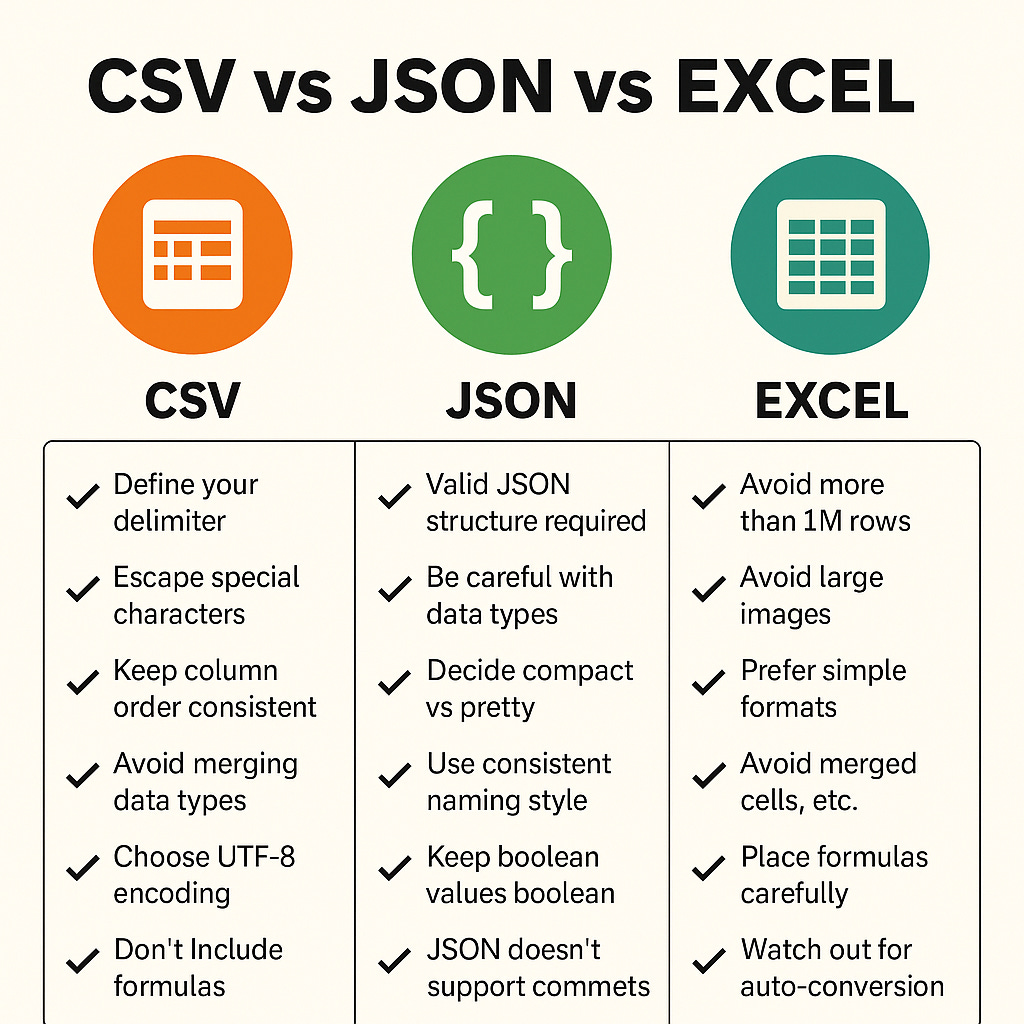
First Step: Understand What These File Formats Actually Represent
Before comparing, understand the nature of the formats.
CSV = Flat data
Rows + columns
No hierarchy
Good for large datasets
Very lightweight
Supported everywhere
JSON = Structured + hierarchical data
Perfect for APIs
Supports nested objects, arrays
Human + machine friendly
Ideal for configuration or complex data structures
Excel = Rich data container
Tables
Formatting
Charts
Formulas
Multiple sheets
Business-friendly
Think of it like this:
FormatReal-world analogyCSVA notebook with only lines — pure raw dataJSONA container with sections, boxes, and labelsExcelA decorated project file with charts, colors, and formulas
Now let’s go deeper.
When Preparing CSV Files — Key Things to Consider
CSV is deceptively simple.
But preparing a CSV correctly requires precision, otherwise one wrong comma breaks the entire dataset.
1. Always define your delimiter (comma, semicolon, tab)
Default is comma (,).
But sometimes fields themselves contain commas:
“John, Alex”, 29, “India”
If you do not quote such fields, your CSV becomes invalid.
Many European countries prefer semicolon (;) because comma is used as a decimal separator.
2. Escape or quote values that contain special characters
Special characters include:
commas
newlines
tabs
quotes
Follow correct quoting:
“Hello, World”
“This is a “”quoted”“ value”
“Line1
Line2”
3. Keep column order consistent
Never reorder columns between exports unless absolutely necessary.
Systems downstream may break.
4. Avoid merging data types in the same column
Bad:
Name, Value
Age, 30
Price, $15
Good:
FieldName, FieldValue, FieldType
Age, 30, Integer
Price, 15, Currency
5. Avoid leading zeros if values represent IDs
Excel automatically removes leading zeros (e.g., 00123 → 123).
Workaround:
Quote them
“00123”Prepend
‘(apostrophe)
6. Choose UTF-8 encoding
Prevent issues with:
special characters
Indian regional languages
emojis
accented names
7. Don’t include formulas
CSV is flat text.
No formulas, no formatting.
If you need formulas → Excel.
When Preparing JSON Files — Key Things to Consider
JSON supports complex, deeply nested structures.
But that power brings its own challenges.
1. Valid JSON structure is mandatory
One missing } will break everything.
Use online validators or automated serializers.
2. Be careful with data types
JSON allows:
numbers
strings
arrays
objects
booleans
null
All numbers default to float / double type — watch out for precision (especially with money).
3. Decide between compact vs pretty JSON
Compact:
{”user”:”John”,”age”:29}
Pretty formatted:
{
  “user”: “John”,
  “age”: 29
}
Pretty printing is good for humans;
compact is good for APIs and file transfer.
✔ 4. Use consistent naming style
camelCase
PascalCase
snake_case
Example:
{
  “firstName”: “John”,
  “lastName”: “Alex”
}
5. Keep boolean values boolean, not strings
Bad:
“isActive”: “true”
Good:
“isActive”: true
6. Large JSON → consider splitting
If your JSON is larger than 5MB:
Break into smaller JSON lines → NDJSON (“newline delimited JSON”)
Use streaming serializers
7. JSON doesn’t support comments
Never write:
{
   // this is a comment
}
It breaks parsing.
When Preparing Excel Files — Key Things to Consider
Excel is powerful, but tricky.
It’s the only format that business teams often request because:
They want filters
They want pivot tables
They want colors
They want formulas
They want multiple sheets
But as a developer, Excel is the easiest format to accidentally misuse.
1. Avoid more than 1 million rows
Excel’s row limit is:
1,048,576 rows
16,384 columns
If you exceed → use CSV instead.
2. Avoid embedding large images inside sheets
This increases file size like crazy.
3. Prefer simple formats rather than heavy styling
Excessive styling = slow opening.
4. If your Excel will be consumed by a program, avoid:
merged cells
formulas
conditional formatting
hidden rows
auto filters
These break automated parsing.
5. If you DO need formulas — place them carefully
Example:
=SUM(A2:A100)
=IF(B2>10, “High”,”Low”)
Always document formulas in a separate sheet.
6. Use freeze panes for readability
Useful for files that business teams use.
7. Use Excel libraries correctly in .NET
Recommended libraries:
EPPlus
ClosedXML
NPOI
Each has pros and cons depending on file size & complexity.
8. Watch out for Excel’s weird auto-conversion
Excel converts:
“1-2” into a date
“0012” into “12”
“TRUE” into boolean
“1.5E5” into exponential
long numbers like credit-card digits into scientific notation
If the content is sensitive → store as text intentionally.
Keep the Momentum Going — Support the Journey
If this post helped you level up or added value to your day, feel free to fuel the next one — Buy Me a Coffee powers deeper breakdowns, real-world examples, and crisp technical storytelling.
Final Comparison — Choosing the Right Format (Simple Mental Model)
✔ Choose CSV when:
You have large or flat data
You don’t need formatting
You want fastest export & import
You want lightweight & universal
✔ Choose JSON when:
You need nested structure
You are interacting with APIs
You need config files or metadata
You need both human & machine readability
✔ Choose Excel when:
Business users are the target
You need formulas/charts
You need multiple sheets
You want filters, pivots, styling
The Ultimate One-Line Rules
CSV:
Use when speed matters. Flat data only.
JSON:
Use when structure matters. Machines + APIs.
Excel:
Use when humans matter. Reporting + visualization.
Closing Note
Choosing the right file format is a subtle but crucial decision in every project.
Knowing the strengths, limits, and preparation rules of CSV, JSON, and Excel makes you a better developer — especially in backend, ETL, reporting, or API design.