


Suppose we already have an event-driven system.
An upstream application continuously produces events such as:
OrderCreated
OrderCancelled
PaymentCompleted
InventoryReserved
CustomerUpdated
A middle integration system receives those events, separates them by type, and publishes them into different streams.
Then several downstream systems consume only the streams they care about.
Previously we designed this as:
Upstream
   ↓
Azure Service Bus
   ↓
.NET Integration Bridge
   ↓
Kafka
   ↓
Downstream Systems
Now the requirement changes:
We don’t want to manage Kafka. We want the entire messaging architecture to stay inside Azure.
The natural question is:
What should replace Kafka?
For this particular architecture, my choice would be:
Azure Event Hubs
Why?
Because Kafka wasn’t being used simply as another queue.
It was providing:
Event streams
Partitions
Consumer groups
Independent consumers
Retention
Replay
High-throughput ingestion
Those are exactly the areas where Azure Event Hubs fits better than trying to use another queue.
Microsoft positions Event Hubs as the Azure service for distributed event streaming, while Service Bus targets enterprise brokered messaging such as workflows, transactions, dead-lettering, sessions, and reliable business-message delivery.
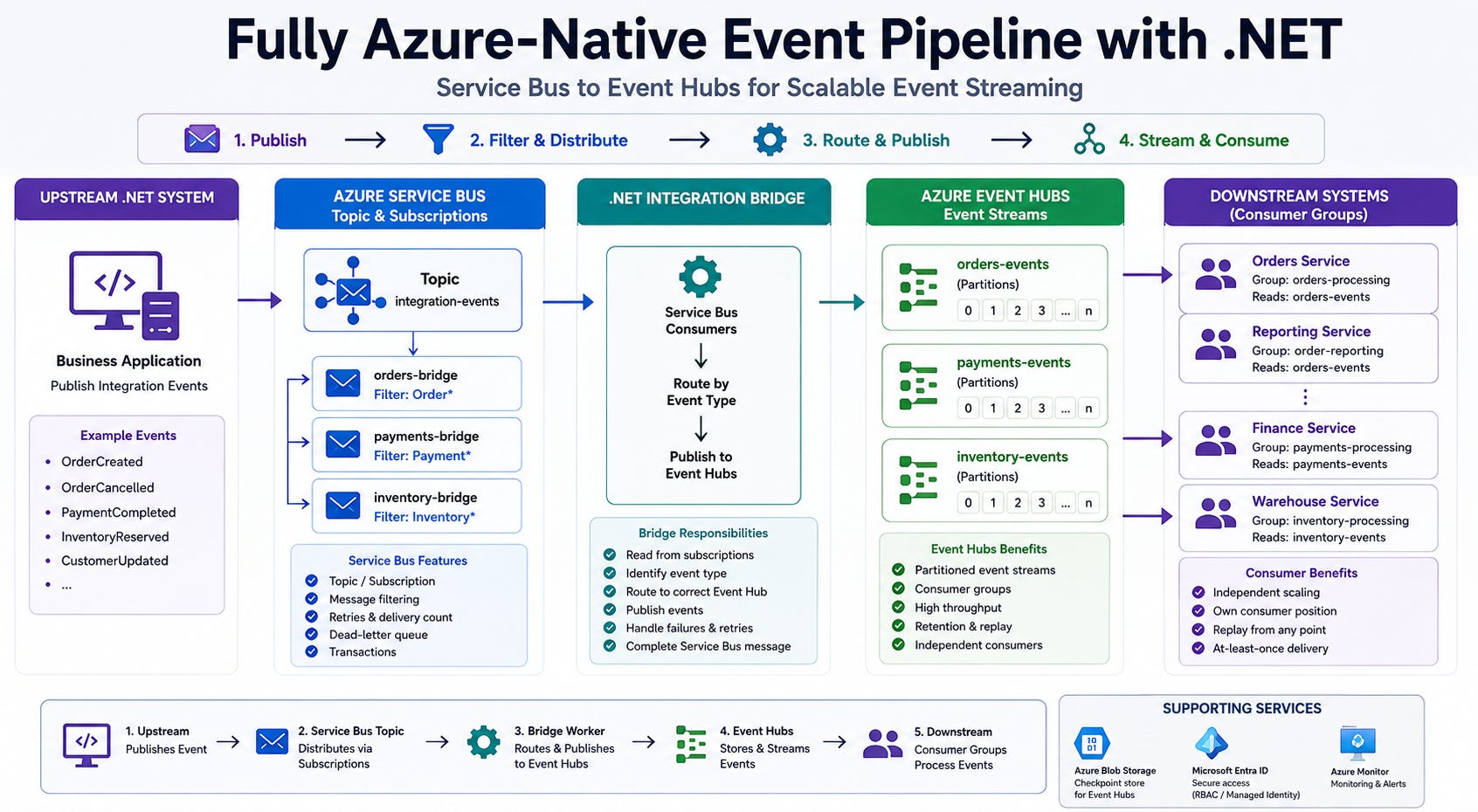
So our new architecture becomes:
                    UPSTREAM .NET SYSTEM

                            │
                            │ Publish
                            ▼

                 Azure Service Bus Topic
                   "integration-events"

                            │
                  Subscription Filters
                            │

             ┌──────────────┼──────────────┐
             │              │              │
             ▼              ▼              ▼

       orders-bridge   payments-bridge inventory-bridge

             │              │              │
             └──────────────┼──────────────┘
                            │
                            ▼

                  .NET Integration Bridge

                            │
                            │ Route by event type
                            ▼

                  Azure Event Hubs Namespace

             ┌──────────────┼──────────────┐
             │              │              │
             ▼              ▼              ▼

        orders-events  payments-events inventory-events

             │              │              │
             ▼              ▼              ▼

       Orders System   Finance System  Warehouse System
Everything remains inside Azure.
1. Why Are We Keeping Service Bus?
At first we might ask:
If Event Hubs can handle events, why not remove Service Bus completely?
Because the two services solve slightly different problems.
Our upstream-to-middle communication contains high-value business messages.
For example:
https://www.youtube.com/@DotNetFullstackDev
OrderCreated
PaymentCompleted
InventoryReserved
We want the middle bridge to explicitly process each message.
If processing fails, we want things such as:
Retry
Delivery count
Dead-lettering
Subscription filtering
Explicit completion
Service Bus provides those brokered-messaging features, including topics, subscriptions, filters, transactions, duplicate detection, sessions, and dead-letter queues.
So I would keep:
https://dotnetfullstackdev.gumroad.com/
Upstream → Service Bus
for reliable enterprise messaging.
Then use:
Middle → Event Hubs → Downstream
for scalable event distribution.
The architecture becomes:
Service Bus
      =
Reliable message delivery

Event Hubs
      =
Durable event stream
That separation is useful.
2. Why Event Hubs Instead of Another Service Bus Topic?
We technically could build:
Service Bus
    ↓
Service Bus
    ↓
Service Bus
There is nothing inherently wrong with that.
In fact, if downstream systems need:
Receive message
Process
Complete message
Retry on failure
Dead-letter poison message
I would seriously consider Service Bus all the way through.
But our previous Kafka layer gave downstream systems a different model:
Orders stream
Payments stream
Inventory stream
Consumers read events independently and maintain their own position.
That is much closer to Event Hubs.
Event Hubs stores events as partitioned streams with time-based retention, and independent consumer groups can read the same stream separately.
Think:
                orders-events

                     │
        ┌────────────┼────────────┐
        │            │            │
        ▼            ▼            ▼

Order Processor   Reporting   Fraud Detection
Each one can consume the same stream independently.
3. Our Azure Resources
Let’s create these resources.
Service Bus
Namespace:
company-integration-sb

Topic:
integration-events
Subscriptions:
orders-bridge
payments-bridge
inventory-bridge
Event Hubs
Create one Event Hubs namespace:
company-business-streams
Inside it:
orders-events

payments-events

inventory-events
Each Event Hub can contain multiple partitions for parallel consumption. Event Hubs partitions are ordered event sequences and are the unit used to scale event processing.
For example:
Keep the Momentum Going — Support the Journey
If this post helped you level up or added value to your day, feel free to fuel the next one — Buy Me a Coffee powers deeper breakdowns, real-world examples, and crisp technical storytelling.
orders-events

Partition 0
Partition 1
Partition 2
Partition 3
4. Consumer Groups
Now create Event Hubs consumer groups.
For:
orders-events
we might create:
orders-processing
order-reporting
order-notifications
This gives us:
                      orders-events

                            │
             ┌──────────────┼───────────────┐
             │              │               │
             ▼              ▼               ▼

       orders-processing order-reporting notifications
Each consumer group maintains its own view of the event stream, allowing different applications to process the same events independently.
This is probably the closest Event Hubs concept to the Kafka consumer-group model we used previously.
5. Common Integration Event
I would keep the same event envelope across the entire architecture.
public sealed record IntegrationEvent(
    Guid EventId,
    string EventType,
    int SchemaVersion,
    string AggregateId,
    string CorrelationId,
    DateTimeOffset OccurredUtc,
    JsonElement Data);
Example:
{
  "eventId": "577552e0-c460-47be-b29d-913934ac6486",
  "eventType": "OrderCreated",
  "schemaVersion": 1,
  "aggregateId": "ORD-10001",
  "correlationId": "REQ-45671",
  "occurredUtc": "2026-08-11T04:00:00Z",
  "data": {
    "orderId": "ORD-10001",
    "customerId": "CUS-501",
    "amount": 1250
  }
}
Two values are especially useful:
EventId
helps us identify a unique event.
AggregateId
helps us consistently partition related events.
6. Upstream Publishes to Service Bus
The upstream application’s responsibility remains simple.
Business operation
       ↓
Create event
       ↓
Publish to Service Bus
Install:
dotnet add package Azure.Messaging.ServiceBus
dotnet add package Azure.Identity
Create the sender:
using Azure.Identity;
using Azure.Messaging.ServiceBus;

var credential =
    new DefaultAzureCredential();

var client =
    new ServiceBusClient(
        "company-integration-sb.servicebus.windows.net",
        credential);

var sender =
    client.CreateSender(
        "integration-events");
Publish:
public async Task PublishAsync(
    IntegrationEvent integrationEvent,
    CancellationToken cancellationToken)
{
    var message =
        new ServiceBusMessage(
            BinaryData.FromObjectAsJson(
                integrationEvent))
        {
            MessageId =
                integrationEvent.EventId.ToString(),

            Subject =
                integrationEvent.EventType,

            CorrelationId =
                integrationEvent.CorrelationId
        };

    message.ApplicationProperties[
        "EventType"] =
        integrationEvent.EventType;

    await sender.SendMessageAsync(
        message,
        cancellationToken);
}
The EventType property is important because Service Bus subscriptions can filter messages using subscription rules.
7. Filter Messages into Middle Subscribers
Create:
orders-bridge
with:
EventType = 'OrderCreated'
OR
EventType = 'OrderCancelled'
Create:
payments-bridge
with:
EventType = 'PaymentCompleted'
OR
EventType = 'PaymentFailed'
Create:
inventory-bridge
with:
EventType = 'InventoryReserved'
OR
EventType = 'InventoryReleased'
Now:
OrderCreated
    ↓
orders-bridge
while:
PaymentCompleted
    ↓
payments-bridge
Service Bus topic subscriptions can each define filter rules that determine which published messages are copied into that subscription.
8. The Middle .NET Integration Bridge
Our middle service now has one job:
Read Service Bus
       ↓
Convert to integration event
       ↓
Choose Event Hub
       ↓
Publish event
       ↓
Complete Service Bus message
Install:
dotnet add package Azure.Messaging.ServiceBus

dotnet add package Azure.Messaging.EventHubs

dotnet add package Azure.Identity
The Event Hubs .NET SDK exposes EventHubProducerClient for publishing events.
9. Create Event Hub Producers
We’ll have:
Orders producer
Payments producer
Inventory producer
For example:
using Azure.Identity;
using Azure.Messaging.EventHubs.Producer;

var credential =
    new DefaultAzureCredential();

string eventHubNamespace =
    "company-business-streams.servicebus.windows.net";

var ordersProducer =
    new EventHubProducerClient(
        eventHubNamespace,
        "orders-events",
        credential);

var paymentsProducer =
    new EventHubProducerClient(
        eventHubNamespace,
        "payments-events",
        credential);

var inventoryProducer =
    new EventHubProducerClient(
        eventHubNamespace,
        "inventory-events",
        credential);
Microsoft’s current Event Hubs .NET guidance supports passwordless authentication with Microsoft Entra credentials and recommends it for production scenarios.
10. Route an Event to the Correct Event Hub
Create:
public sealed class EventHubRouter
{
    private readonly EventHubProducerClient
        _ordersProducer;

    private readonly EventHubProducerClient
        _paymentsProducer;

    private readonly EventHubProducerClient
        _inventoryProducer;

    public EventHubRouter(
        EventHubProducerClient ordersProducer,
        EventHubProducerClient paymentsProducer,
        EventHubProducerClient inventoryProducer)
    {
        _ordersProducer = ordersProducer;
        _paymentsProducer = paymentsProducer;
        _inventoryProducer = inventoryProducer;
    }

    public Task PublishAsync(
        IntegrationEvent integrationEvent,
        CancellationToken cancellationToken)
    {
        EventHubProducerClient producer =
            integrationEvent.EventType switch
            {
                "OrderCreated"
                    or "OrderCancelled"
                        => _ordersProducer,

                "PaymentCompleted"
                    or "PaymentFailed"
                        => _paymentsProducer,

                "InventoryReserved"
                    or "InventoryReleased"
                        => _inventoryProducer,

                _ => throw new
                    InvalidOperationException(
                        $"Unknown event type: " +
                        integrationEvent.EventType)
            };

        return PublishAsync(
            producer,
            integrationEvent,
            cancellationToken);
    }
Then publish:
private static async Task PublishAsync(
    EventHubProducerClient producer,
    IntegrationEvent integrationEvent,
    CancellationToken cancellationToken)
{
    var options =
        new CreateBatchOptions
        {
            PartitionKey =
                integrationEvent.AggregateId
        };

    using EventDataBatch batch =
        await producer.CreateBatchAsync(
            options,
            cancellationToken);

    var eventData =
        new EventData(
            BinaryData.FromObjectAsJson(
                integrationEvent));

    eventData.Properties["EventId"] =
        integrationEvent.EventId.ToString();

    eventData.Properties["EventType"] =
        integrationEvent.EventType;

    eventData.Properties["CorrelationId"] =
        integrationEvent.CorrelationId;

    if (!batch.TryAdd(eventData))
    {
        throw new InvalidOperationException(
            "Event is too large for the Event Hubs batch.");
    }

    await producer.SendAsync(
        batch,
        cancellationToken);
}
Event Hubs supports batches and partition-aware publishing; events can be assigned using a partition key when we want related events routed consistently.
https://dotnetfullstackdev.gumroad.com/
11. Why Use OrderId as Partition Key?
Suppose:
ORD-10001
creates several events:
OrderCreated
OrderConfirmed
OrderPacked
OrderShipped
OrderDelivered
If they all use:
AggregateId = ORD-10001
as their partition key, related events are directed consistently to the same partition.
Event Hubs provides ordering within an individual partition.
That makes entity-level ordering much easier to reason about.
https://www.youtube.com/@DotNetFullstackDev
12. Service Bus to Event Hubs Processing
Now our Service Bus worker looks like:
private async Task ProcessMessageAsync(
    ProcessMessageEventArgs args)
{
    try
    {
        IntegrationEvent? integrationEvent =
            args.Message.Body
                .ToObjectFromJson<
                    IntegrationEvent>();

        if (integrationEvent is null)
        {
            await args.DeadLetterMessageAsync(
                args.Message,
                "InvalidEvent",
                "Unable to deserialize event.");

            return;
        }

        await _eventHubRouter.PublishAsync(
            integrationEvent,
            args.CancellationToken);

        /*
         * Event Hubs accepted the event.
         * Now complete Service Bus.
         */
        await args.CompleteMessageAsync(
            args.Message);
    }
    catch (Exception exception)
    {
        _logger.LogError(
            exception,
            "Bridge processing failed.");

        await args.AbandonMessageAsync(
            args.Message);
    }
}
The important sequence is:
Receive Service Bus
       ↓
Publish Event Hubs
       ↓
Successful?
       ↓
Complete Service Bus
Never:
Complete Service Bus
       ↓
Try Event Hubs
because that could lose the event if Event Hubs publishing fails afterward.
13. What if Event Hubs Is Temporarily Unavailable?
Imagine:
Service Bus message received
        ↓
Event Hubs unavailable
        ↓
Publish fails
The bridge executes:
await args.AbandonMessageAsync(
    args.Message);
Service Bus can redeliver the message.
If repeated processing exceeds the subscription’s configured maximum delivery count, Service Bus can place the message into its dead-letter subqueue. Service Bus has built-in dead-lettering; Event Hubs itself does not.
So our bridge failure safety remains with Service Bus.
14. Now the Event Exists in Event Hubs
After successful routing:
OrderCreated
      ↓
orders-events
or:
PaymentCompleted
      ↓
payments-events
or:
InventoryReserved
      ↓
inventory-events
Unlike a traditional queue where receiving and completing normally removes a message from active delivery, Event Hubs works as a retained event stream. Consumers track their position in each partition.
This is why it is such a natural Kafka replacement.
15. Downstream .NET Consumer
Let’s build:
Orders.Downstream.Worker
It consumes:
orders-events
using consumer group:
orders-processing
Install:
dotnet add package Azure.Messaging.EventHubs

dotnet add package Azure.Messaging.EventHubs.Processor

dotnet add package Azure.Storage.Blobs

dotnet add package Azure.Identity
For production-scale .NET processing, Microsoft provides EventProcessorClient, which coordinates partition ownership and checkpointing across processor instances.
16. Why Do We Need Azure Blob Storage?
Event Hubs does not track every application’s processing position for us in the same way a Service Bus subscription settles messages.
Our consumer needs a checkpoint.
Think:
Partition 0 → processed until offset 900

Partition 1 → processed until offset 1200

Partition 2 → processed until offset 755
EventProcessorClient commonly uses Azure Blob Storage as its checkpoint store. Microsoft’s .NET quickstart also uses Blob Storage for this purpose.
Create:
Storage Account

eventhub-checkpoints container
Now our complete Azure architecture includes:
Service Bus
Event Hubs
Blob Storage
17. Build the Downstream Processor
Create clients:
Keep the Momentum Going — Support the Journey
If this post helped you level up or added value to your day, feel free to fuel the next one — Buy Me a Coffee powers deeper breakdowns, real-world examples, and crisp technical storytelling.
using Azure.Identity;
using Azure.Messaging.EventHubs.Processor;
using Azure.Storage.Blobs;

var credential =
    new DefaultAzureCredential();

var checkpointStore =
    new BlobContainerClient(
        new Uri(
            "https://companystorage.blob.core.windows.net/eventhub-checkpoints"),
        credential);

await checkpointStore
    .CreateIfNotExistsAsync();

var processor =
    new EventProcessorClient(
        checkpointStore,
        "orders-processing",
        "company-business-streams.servicebus.windows.net",
        "orders-events",
        credential);
The processor handles all partitions for that Event Hub/consumer-group pair and can cooperate with other processor instances to share partition ownership.
18. Process Events
Register:
processor.ProcessEventAsync +=
    ProcessEventAsync;

processor.ProcessErrorAsync +=
    ProcessErrorAsync;

await processor.StartProcessingAsync();
Our handler:
private async Task ProcessEventAsync(
    ProcessEventArgs args)
{
    IntegrationEvent? integrationEvent =
        args.Data.EventBody
            .ToObjectFromJson<
                IntegrationEvent>();

    if (integrationEvent is null)
    {
        return;
    }

    await _orderProcessor.ProcessAsync(
        integrationEvent,
        args.CancellationToken);

    await args.UpdateCheckpointAsync(
        args.CancellationToken);
}
Notice:
Process business operation
       ↓
Successful
       ↓
Update checkpoint
That order is important.
19. Scaling the Downstream System
Suppose:
orders-events
has four partitions.
Initially:
Orders Worker 1
may process all four.
When traffic increases, run:
Orders Worker 1
Orders Worker 2
with the same:
consumer group = orders-processing
EventProcessorClient can coordinate those instances and distribute partition ownership between them.
Conceptually:
orders-events

Partition 0 ───→ Worker 1
Partition 1 ───→ Worker 1

Partition 2 ───→ Worker 2
Partition 3 ───→ Worker 2
Add more consumers as appropriate for the available partitions and workload.
20. Another Downstream System Wants the Same Orders
Now suppose reporting also needs every order event.
Don’t add it to:
orders-processing
Create another consumer group:
order-reporting
Now:
                    orders-events

                        │
             ┌──────────┴───────────┐
             │                      │
             ▼                      ▼

       orders-processing       order-reporting
             │                      │
             ▼                      ▼

         Order DB               Analytics DB
Both applications independently read the same stream. Consumer groups provide independent views of an Event Hub.
21. Replay Is Where Event Hubs Becomes Particularly Useful
Imagine the reporting database is corrupted.
We fix it.
Now we want:
Rebuild reports
from historical order events.
Because Event Hubs retains the event stream for a configurable time window, a consumer can read earlier retained events again by starting from an earlier position or checkpoint. Microsoft specifically describes Event Hubs as supporting retention and replay scenarios.
That is something we didn’t naturally get from a normal work queue.
This was one of Kafka’s major benefits.
Event Hubs gives us the Azure-managed version of that concept.
For longer-term retention, Event Hubs Capture can write streaming data into Azure Storage or Azure Data Lake.
22. Duplicate Processing Still Matters
Do not assume:
Event Hubs
=
exactly one business execution
Consumers should still be idempotent.
Use:
EventId
as the business deduplication key.
For example:
ConsumerInbox

EventId
ConsumerName
ProcessedUtc
Before updating the business database:
Event received
      ↓
Has EventId already been processed?
      │
   ┌──┴──┐
   │     │
 Yes     No
   │     │
 Skip   Process
          ↓
       Save EventId
Then checkpoint.
This protects us if processing succeeds but checkpointing doesn’t.
23. What About Dead-Lettering in Event Hubs?
This is one area where Event Hubs is intentionally different from Service Bus.
Event Hubs does not provide a Service-Bus-style built-in DLQ. Microsoft’s current Azure messaging comparison lists dead-lettering for Service Bus but not Event Hubs.
So downstream poison-event handling is something we design.
For example:
https://dotnetfullstackdev.gumroad.com/
orders-events
      ↓
Orders Worker
      ↓
Processing fails repeatedly
      ↓
Service Bus Queue:
orders-processing-errors
Then operations can investigate and replay.
This hybrid approach is perfectly reasonable:
Event Hubs
      =
Stream

Service Bus error queue
      =
Operational poison-message handling
24. The Final Fully Azure-Native Architecture
Now our system looks like:
https://www.youtube.com/@DotNetFullstackDev
                     UPSTREAM SYSTEM

                    ASP.NET Core API
                          │
                          ▼
               Azure Service Bus Topic
                "integration-events"
                          │
                Filtered subscriptions
                          │

          ┌───────────────┼───────────────┐
          │               │               │
          ▼               ▼               ▼

      Orders Sub      Payments Sub    Inventory Sub

          │               │               │
          └───────────────┼───────────────┘
                          ▼

                 .NET Integration Bridge

                          │
                          ▼

                  Azure Event Hubs

          ┌───────────────┼───────────────┐
          │               │               │
          ▼               ▼               ▼

    orders-events   payments-events inventory-events

          │               │               │
          ▼               ▼               ▼

   Orders Worker    Finance Worker  Warehouse Worker

          │               │               │
          ▼               ▼               ▼

       Databases       Databases       Databases


                Azure Blob Storage
                       │
                       ▼
              Consumer checkpoints
No Kafka cluster.
No Kafka brokers to operate.
No ZooKeeper-style infrastructure concerns.
The event-streaming layer becomes a managed Azure PaaS service, and Event Hubs even supports the Kafka protocol if a future consumer still needs Kafka-compatible clients.
25. Service Bus vs Event Hubs in This Architecture
The easiest way I would explain the division is:
RequirementService BusEvent HubsBusiness message processingExcellentPossible, but not its main modelTopic/subscription filteringYesNo equivalent subscription filtersExplicit complete/abandonYesStream/checkpoint modelBuilt-in DLQYesNoTransactionsYesNoPartitionsLimited messaging conceptCore architectureConsumer groupsNo Kafka-style groupsYesReplay retained streamNot its primary modelYesHigh-volume streamingNot primary purposeExcellentMultiple independent readersSubscriptionsConsumer groups
These differences are reflected in Microsoft’s current Azure messaging-service comparison.
26. The Decision Rule I Would Keep
If someone asks:
Should I use Service Bus or Event Hubs?
I would first ask:
Is this a message that somebody must process?
For example:
CreateInvoice
ReserveInventory
ChargeCustomer
Think:
Service Bus
because the application cares about reliable brokered processing.
Keep the Momentum Going — Support the Journey
If this post helped you level up or added value to your day, feel free to fuel the next one — Buy Me a Coffee powers deeper breakdowns, real-world examples, and crisp technical storytelling.
Is this something that happened and multiple applications may want to observe now or replay later?
For example:
OrderCreated
PaymentCompleted
InventoryChanged
CustomerUpdated
Think:
Event Hubs
especially when the requirement resembles a distributed event stream.
Microsoft similarly distinguishes Service Bus as enterprise transactional messaging and Event Hubs as event-stream ingestion.
Final Mental Model
The entire solution can be remembered as:
UPSTREAM

Business event created
      ↓
Service Bus
Service Bus answers:
Who should reliably receive
this message?
Then:
MIDDLE

Subscription
      ↓
.NET Bridge
      ↓
Event Type
      ↓
Event Hub
The bridge answers:
Which event stream
does this belong to?
Then:
DOWNSTREAM

Event Hub
      ↓
Consumer Group
      ↓
Partitions
      ↓
.NET Consumer
Event Hubs answers:
Which applications want to
independently consume this stream?
And finally:
EventId
      ↓
Idempotency

Partition Key
      ↓
Entity ordering

Checkpoint
      ↓
Consumer progress

Retention
      ↓
Replay
That gives us a completely Azure-native event architecture:
Azure Service Bus
       ↓
.NET Integration Bridge
       ↓
Azure Event Hubs
       ↓
.NET Downstream Consumers
       ↓
Azure Databases / Services
For the original requirement, this is the architecture I would choose when the goal is specifically to remove Kafka without losing the streaming behaviour Kafka was providing.